Nástroje (Tools)#
Kadenčné skupiny (Cadence Groups)#
Cadence groups help regulate SMS traffic by applying configurable time and volume limits. They let you define when messages can be sent and how many are allowed within a given period, making bulk campaigns run more smoothly and improving coordination with downstream systems such as call centers.
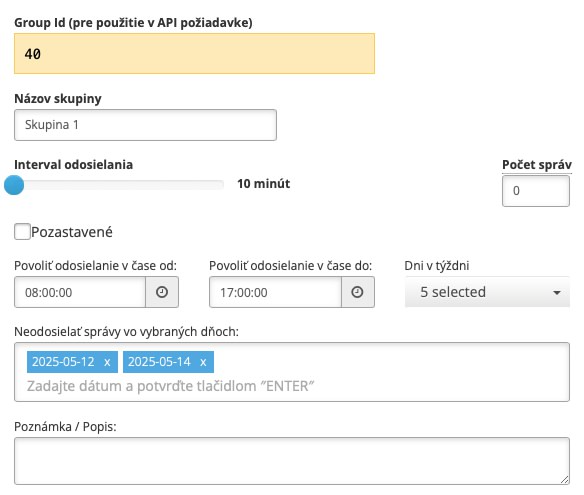
Functionality
Time Windows
For each group, you can define a specific time range during which SMS messages may be sent (e.g. 09:00-18:00).
Allowed Days of the Week
In addition to time, you can also specify the exact days when the group is active (e.g. Monday through Friday).
Disabling Sending on Specific Dates
Within a group, it is also possible to block sending on specific dates, which is useful for preventing messages from being sent on public holidays. For example, if a group is configured to send on business days, but Thursday 2025-05-01 is a holiday, that day can be easily paused. Dates must be entered in the format year-month-day, e.g. 2025-05-01.
Message Count Limit
Each cadence group can have a maximum number of messages that may be sent within the defined time interval (e.g. 200 SMS per hour). This limit can also be adjusted dynamically during an active campaign.
Dynamic Adjustment During Sending
The system allows modifying parameters (such as messages per hour) even while a campaign is running. This is useful in situations where call center availability changes or when sending volume needs to be quickly adjusted.
Use Cases
- Marketing campaigns sent only during business hours.
- Reducing sending frequency when the call center is overloaded.
- Preventing message delivery during weekends and holidays.